Technical Internship resume template
A structured serif layout for technical projects, tools, coursework, and practical experience, with ruled section headings.
Before you download: Keep project tools beside the work they supported. Preserve the ruled headings and 11 pt serif body; check repository links and page breaks after editing.
All names, organizations and achievements in this sample are fictional. Replace them with your own facts.
Showing the 1-page sample.
Technical Internship preview
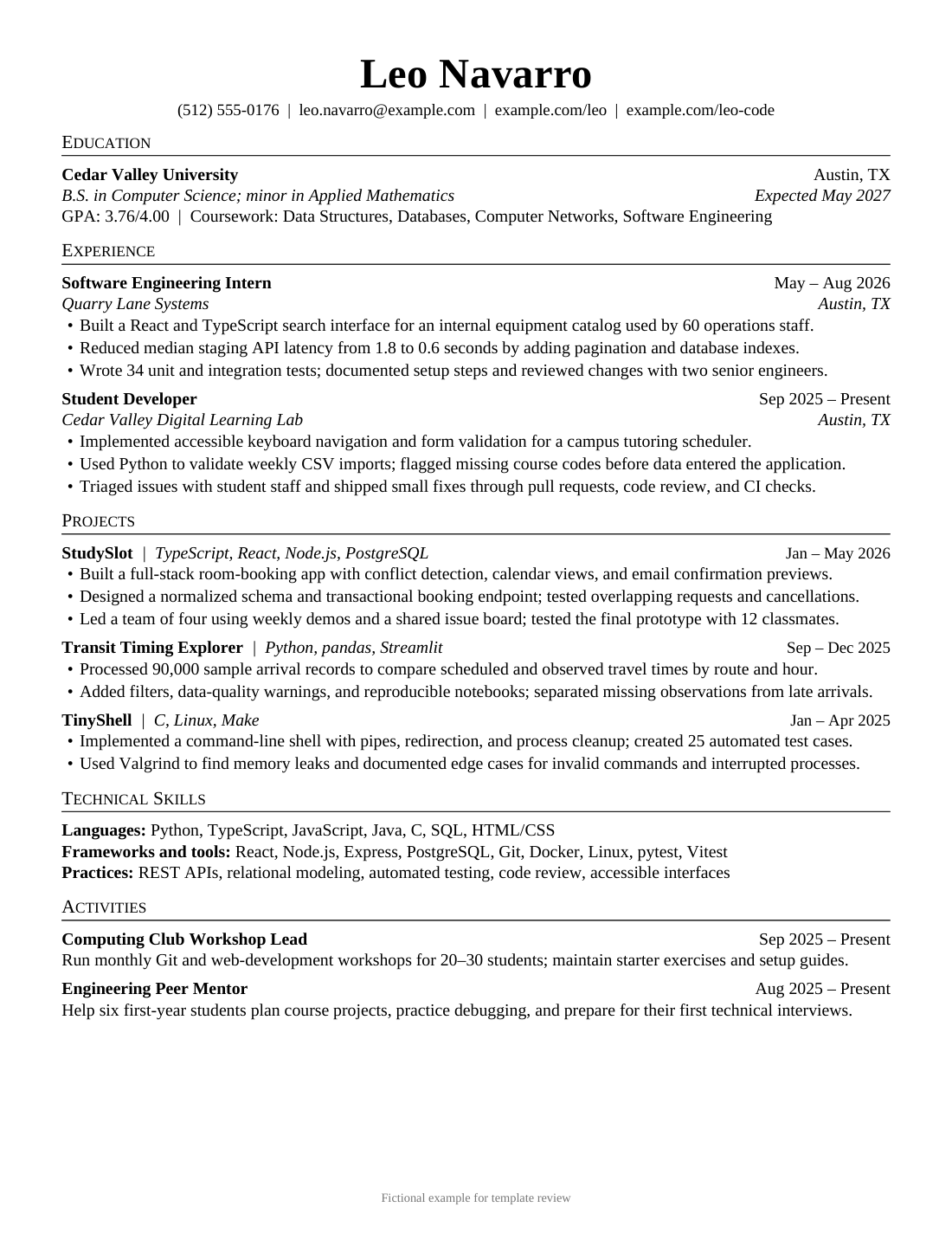
1-page sample in readable text
The wording below comes from the selected Word sample. All people, organizations and achievements are fictional. Use Page preview to see the document layout.
Leo Navarro
(512) 555-0176 | leo.navarro@example.com | example.com/leo | example.com/leo-code
Education
Cedar Valley University Austin, TX
B.S. in Computer Science; minor in Applied Mathematics Expected May 2027
GPA: 3.76/4.00 | Coursework: Data Structures, Databases, Computer Networks, Software Engineering
Experience
Software Engineering Intern May – Aug 2026
Quarry Lane Systems Austin, TX
- Built a React and TypeScript search interface for an internal equipment catalog used by 60 operations staff.
- Reduced median staging API latency from 1.8 to 0.6 seconds by adding pagination and database indexes.
- Wrote 34 unit and integration tests; documented setup steps and reviewed changes with two senior engineers.
Student Developer Sep 2025 – Present
Cedar Valley Digital Learning Lab Austin, TX
- Implemented accessible keyboard navigation and form validation for a campus tutoring scheduler.
- Used Python to validate weekly CSV imports; flagged missing course codes before data entered the application.
- Triaged issues with student staff and shipped small fixes through pull requests, code review, and CI checks.
Projects
StudySlot | TypeScript, React, Node.js, PostgreSQL Jan – May 2026
- Built a full-stack room-booking app with conflict detection, calendar views, and email confirmation previews.
- Designed a normalized schema and transactional booking endpoint; tested overlapping requests and cancellations.
- Led a team of four using weekly demos and a shared issue board; tested the final prototype with 12 classmates.
Transit Timing Explorer | Python, pandas, Streamlit Sep – Dec 2025
- Processed 90,000 sample arrival records to compare scheduled and observed travel times by route and hour.
- Added filters, data-quality warnings, and reproducible notebooks; separated missing observations from late arrivals.
TinyShell | C, Linux, Make Jan – Apr 2025
- Implemented a command-line shell with pipes, redirection, and process cleanup; created 25 automated test cases.
- Used Valgrind to find memory leaks and documented edge cases for invalid commands and interrupted processes.
Technical Skills
Languages: Python, TypeScript, JavaScript, Java, C, SQL, HTML/CSS
Frameworks and tools: React, Node.js, Express, PostgreSQL, Git, Docker, Linux, pytest, Vitest
Practices: REST APIs, relational modeling, automated testing, code review, accessible interfaces
Activities
Computing Club Workshop Lead Sep 2025 – Present
Run monthly Git and web-development workshops for 20–30 students; maintain starter exercises and setup guides.
Engineering Peer Mentor Aug 2025 – Present
Help six first-year students plan course projects, practice debugging, and prepare for their first technical interviews.
Fictional example for template review
Edit Technical Internship in Word
One page works for a few projects with distinct technical evidence and selected experience. Choose two when you can explain additional implementation decisions, testing or collaboration without repeating the technology list. Keep Technical Skills and Activities after the expanded work.
Section order: Education → Experience → Projects; additional project and mentoring detail in the two-page version → Technical Skills → Activities
Identify your own implementation
Replace each project name, date, technology list and link. State which feature, component or test you completed. Label classroom work and prototypes accurately, and distinguish a local or staging result from production performance.
Reuse the ruled headings
Paste replacement wording into existing entries so the heading rules, date alignment and small-cap styling remain consistent. The body is 11 pt Liberation Serif; if your editor substitutes another font, inspect the longest project and tool lines for new wraps.
Keep a project together
Check that a project name and its first explanation stay on the same page. Use the existing page break as a starting point in the two-page version; move it if your entries change length. Avoid a second page containing only a skills list.
Why this sample bullet works
Fictional example from the 1-page sample
Reduced median staging API latency from 1.8 to 0.6 seconds by adding pagination and database indexes.
The wording specifies the measurement, the environment and the changes made. Calling it staging avoids presenting a test result as a live customer outcome. Use a measured result only when you know how it was obtained; otherwise describe the implemented feature and its tests.
Find the facts for your own version
- What component did you build or change yourself?
- How, where and under what conditions was it tested?
- Do you have comparable before-and-after measurements, or a demonstrable working feature?
Use only details you can support. You do not need to invent a number to describe useful work.